Explore with your own agent#
Bring a question from your reading or course task. Your agent can search the book, follow explained concept connections, and help you plan a short experiment. You choose the tools and check the explanation against the cited material.
Connect an MCP client#
Add this server in your client's MCP settings:
https://scalableweb.dev/mcp
Choose Streamable HTTP and No authentication. The server reads public learning material; no website account, companion, or model API key is required to connect. Your agent's own access and usage terms still apply. Opening the endpoint as an ordinary webpage does not start an agent conversation.
For Codex, run:
codex mcp add scalableweb --url https://scalableweb.dev/mcp
codex mcp list
Then ask your agent:
Use the scalableweb tools to help me get started. Offer a reading, a connection between queue and latency, or a short experiment. Ask one question and wait for my prediction.
For ChatGPT, follow OpenAI's custom MCP setup: add the URL under Plugins, choose No authentication, install the personal plugin, and invoke it in a new Work chat. Availability depends on your account and workspace settings. This is a connection to a public server, not an entry in the public plugin directory.
Try one investigation#
- Find a passage. Ask “Find where the book explains stable averages and read the relevant passage.” Check the citation yourself.
- Connect two ideas. Predict how a queue might affect latency. Ask the agent to check the authored connection and its conditions.
- Try an experiment. Ask for the queue balance lab. Make a prediction before opening it, change one control, then explain the observation.
The tools provide concepts, assumptions, common mistakes, passages, activities, graphics and demo instructions. The server cannot see your open tab, private notebook, saved exercise answers or conversations, and cannot operate a demo. Use the local companion for the website's Notebook and Teaching assistant with explicitly shared context and browser tools.
Interactive explanations depend on your agent's client. An agent-created diagram or simulation should preserve the source assumptions and identify any changes. Bring back the controls and observations yourself unless the agent's tools actually expose them. A static preview or generated output is not evidence that the original experiment ran.
Use the guide without MCP#
Give your agent the Markdown guide, or choose an activity starting point. The Markdown files are served as UTF-8 plain text for compatibility with URL readers. For a file-based agent, download the guide and the Markdown graph or JSON graph; supply cited reading pages separately when needed. No MCP connection is required for this route.
Codex uses cached web search by default, so a pasted URL can produce an old response or appear unavailable. Ask it to use direct HTTP retrieval when you need the current files:
Read https://scalableweb.dev/concepts/agent-guide.md using
curl, follow its graph link, then download the Little's Law PNG and show it with your local image viewer. Cite the source URL.
The Codex CLI also supports codex --search for live web search.
If a connection or retrieval fails, ask the agent to say what it actually accessed, then use the guide or reading directly.
If a diagram does not appear#
The guide explains how to find graphics; the images are separate files referenced by the graph. Ask your agent which image URL it retrieved and whether its client can inspect or display images. For a direct check, open the Little's Law connection diagram in your browser. A working image link confirms that the file is available; the agent's retrieval and display capabilities still need checking.
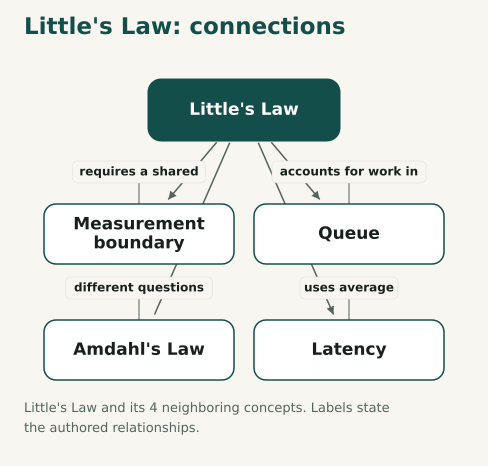
For Codex with terminal and image-viewing tools, ask it to download the linked PNG and open the local file with its image viewer.
The viewer can show the diagram even when a remote Markdown image remains a link.
If its URL reader cannot read the guide, ask it to download the guide and graph with an HTTP tool such as curl, or connect through MCP.
A client that cannot display an image should return its descriptive link and source instead.